Invoicing for Contractors:
Send Your First Job Invoice in 5 Minutes
Here is how to invoice as a contractor in Deepsel: add the customer, build the job from your price book, create the job invoice and send it. Five steps on a brand-new account, with a screenshot of each. A job doesn't need a scheduled visit to be billed, so there is no dispatch to set up first.
2184 Hawthorne Ridge Dr
Marietta, GA 30062
Job #1023 · Oct 27, 2026
| Item | Qty | Price | Total |
|---|---|---|---|
| Diagnostic feeFull system diagnosis to find the cause of the problem | 1 | $89.00 | $89.00 |
| LaborTechnician labor, billed per hour | 1.5 | $125.00 | $187.50 |
| Subtotal | $276.50 | ||
| Tax | $0.00 | ||
| Total due | $276.50 | ||
Hi Michael, thanks for having us out this morning. Your AC is cooling again.
Pay $276.50 by cardContractor invoicing in five steps.
Contractor invoicing goes quickest when the invoice is built from the job instead of retyped. The price book holds the services and parts you sell, each with a price and a description. Set it up once and every job invoice after that pulls from it. The screens below are from a demo account with a made-up customer.
Add the customer
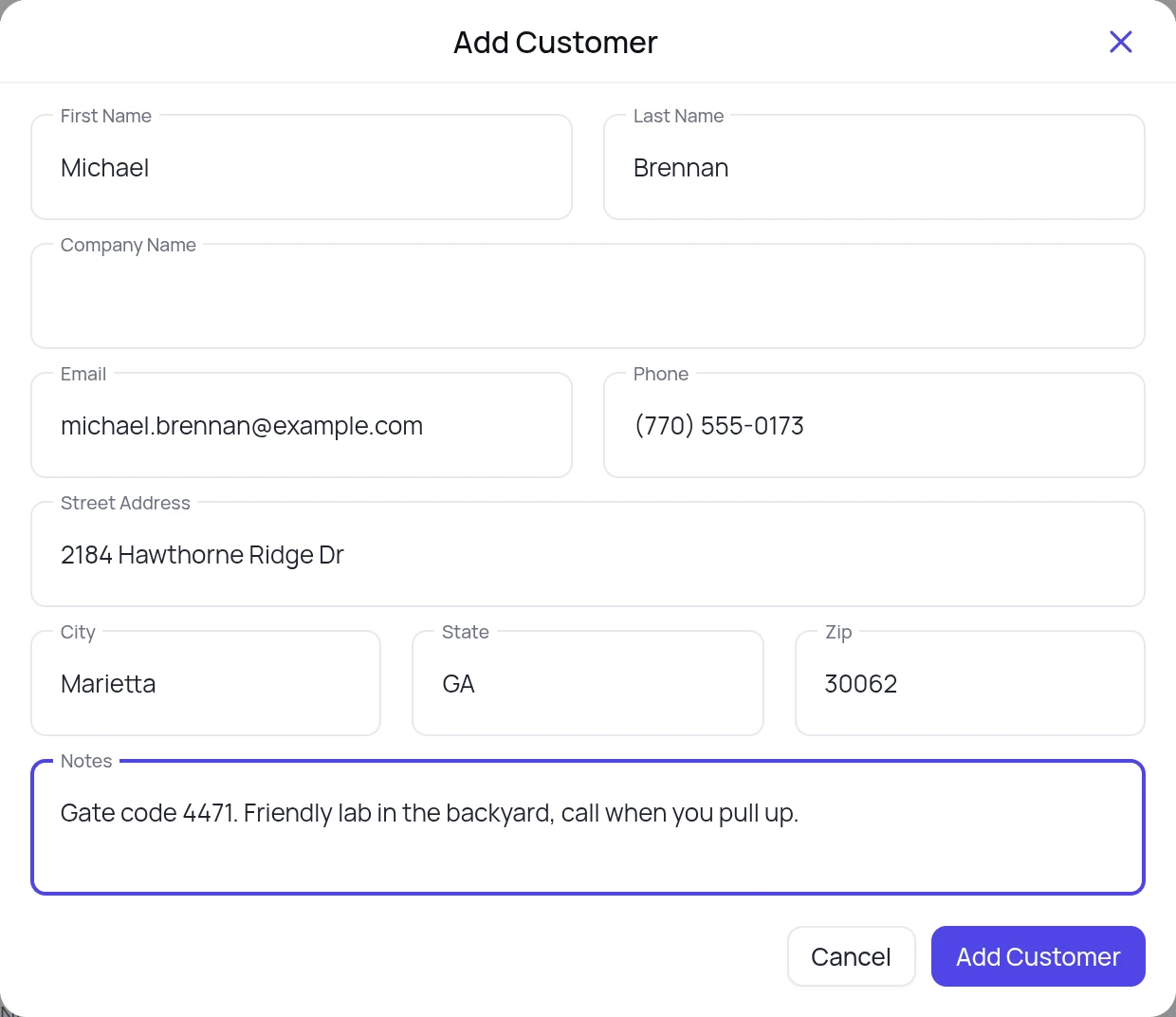
Open Customers and tap New customer. Fill in the name, phone, email and address. The notes field stays on the customer record, so the gate code and the dog are there for every job you do for them.
The address becomes the customer's primary service location. Coming from another platform? Upload your customer list instead and skip to step 2.
Create the job from their record
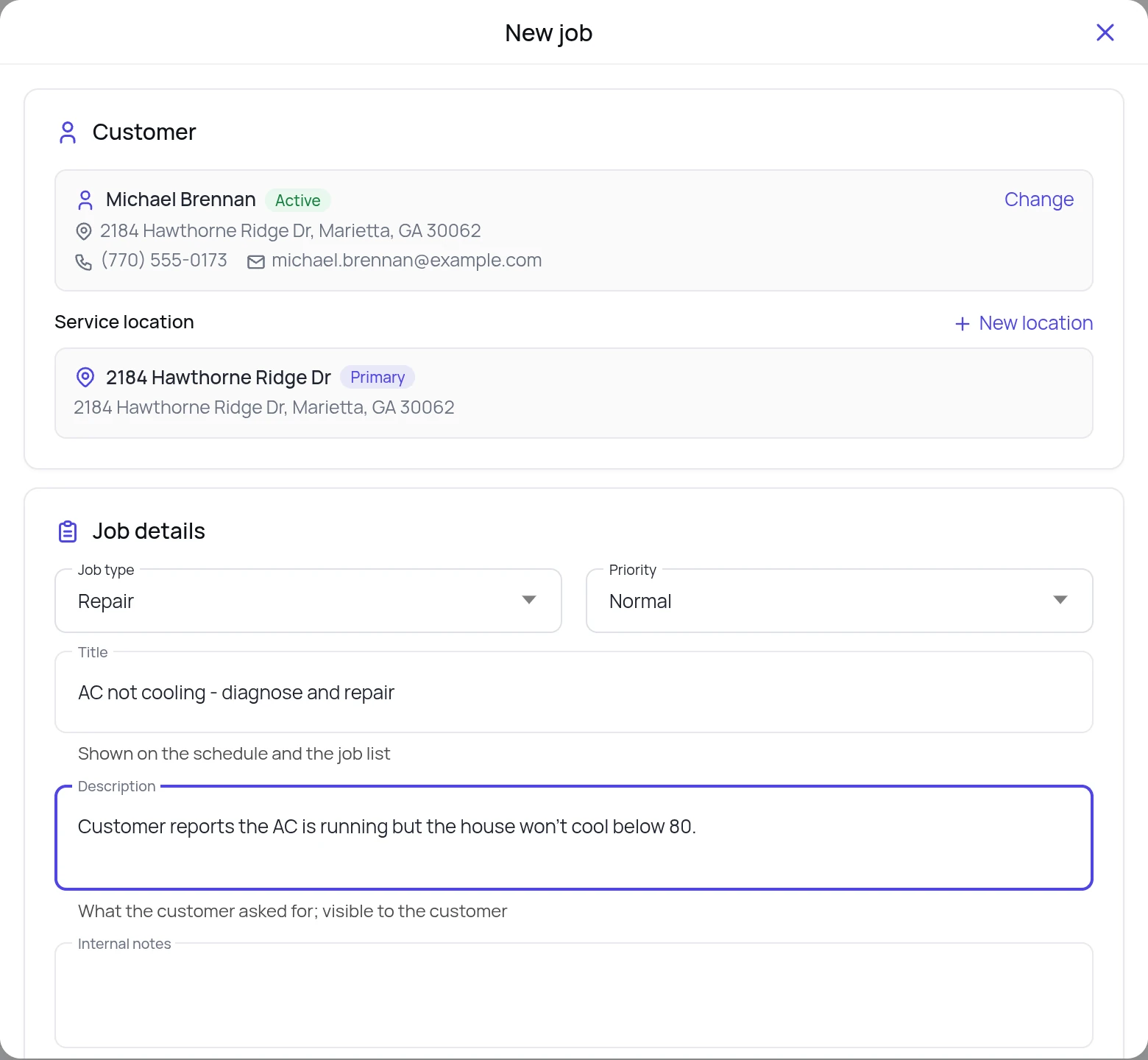
Open the customer and tap New job. The customer and the service location are already filled in. Pick the job type and priority, then add a title and what the customer reported. The title is what the schedule and the job list show, and the description is visible to the customer.
Internal notes are for the office and the techs only.
Add line items from the price book
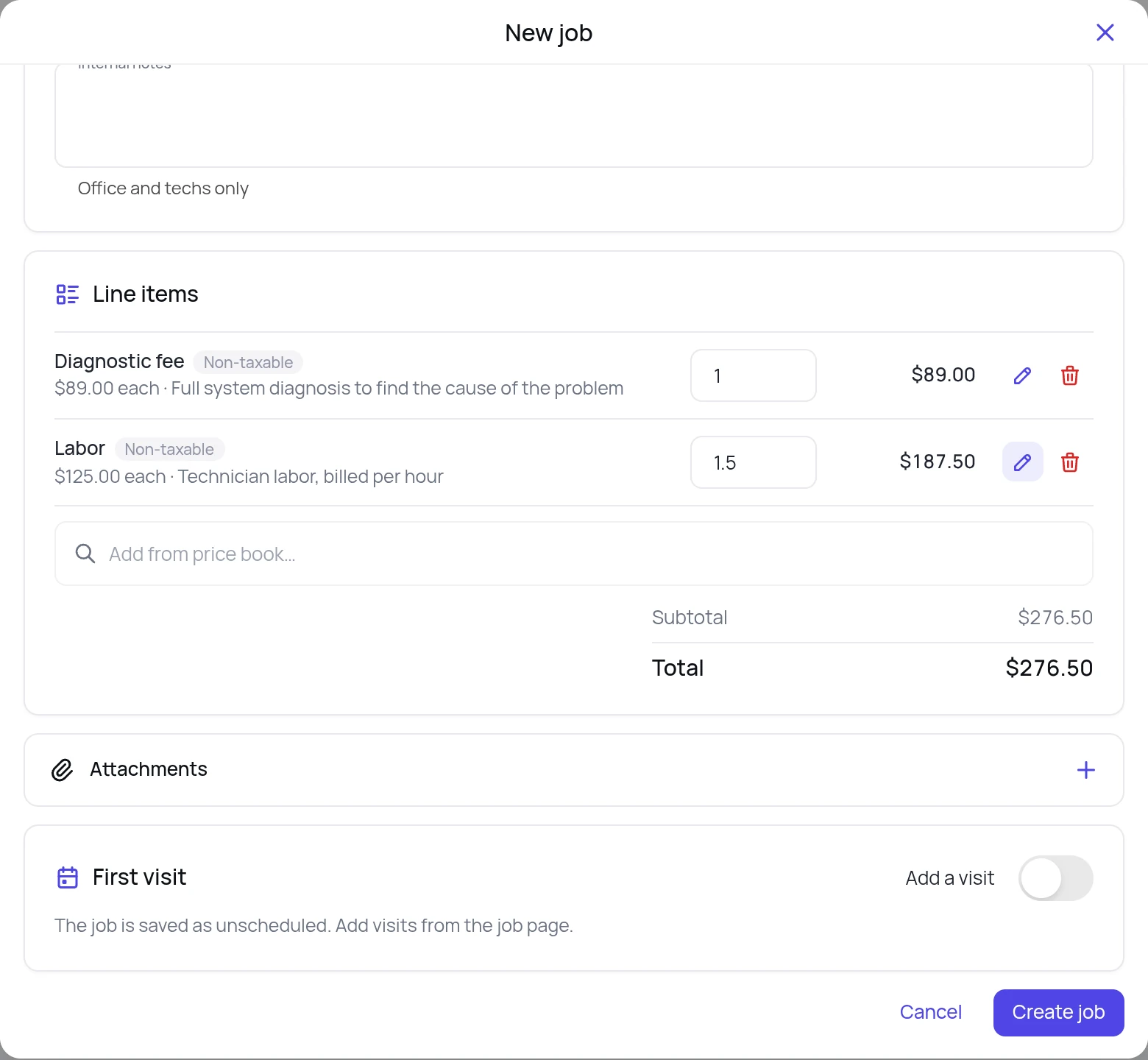
Scroll to Line items and search the price book. Tap an item and it is added with its price and description. Change the quantity where you need to: here it is one diagnostic fee at $89.00 and 1.5 hours of labor at $125.00 an hour, $276.50 in all.
Under First visit, switch off Add a visit if there is nothing to schedule yet. The job is saved as unscheduled and you can add visits from the job page later. Then tap Create job.
Create the job invoice from the job
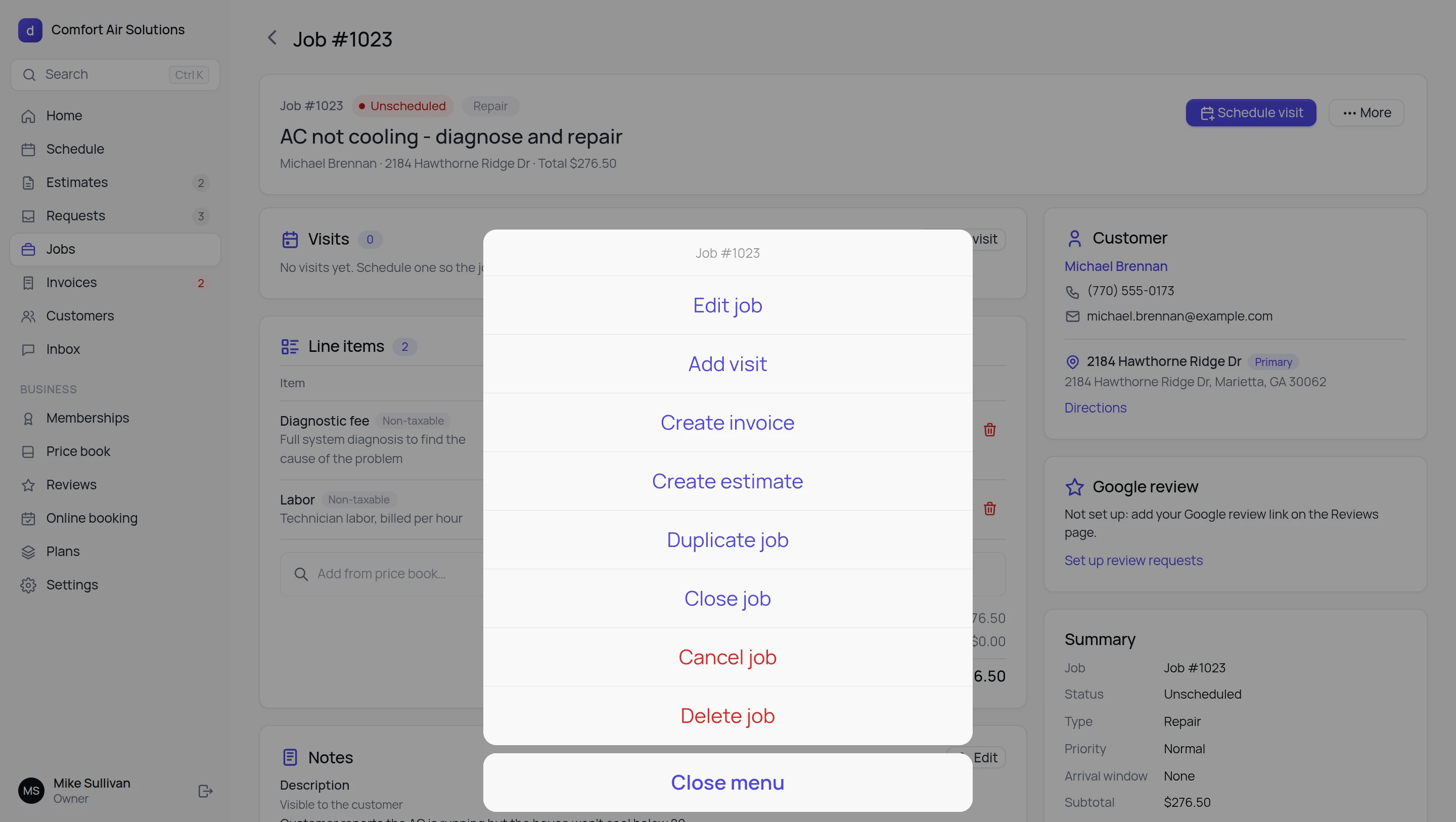
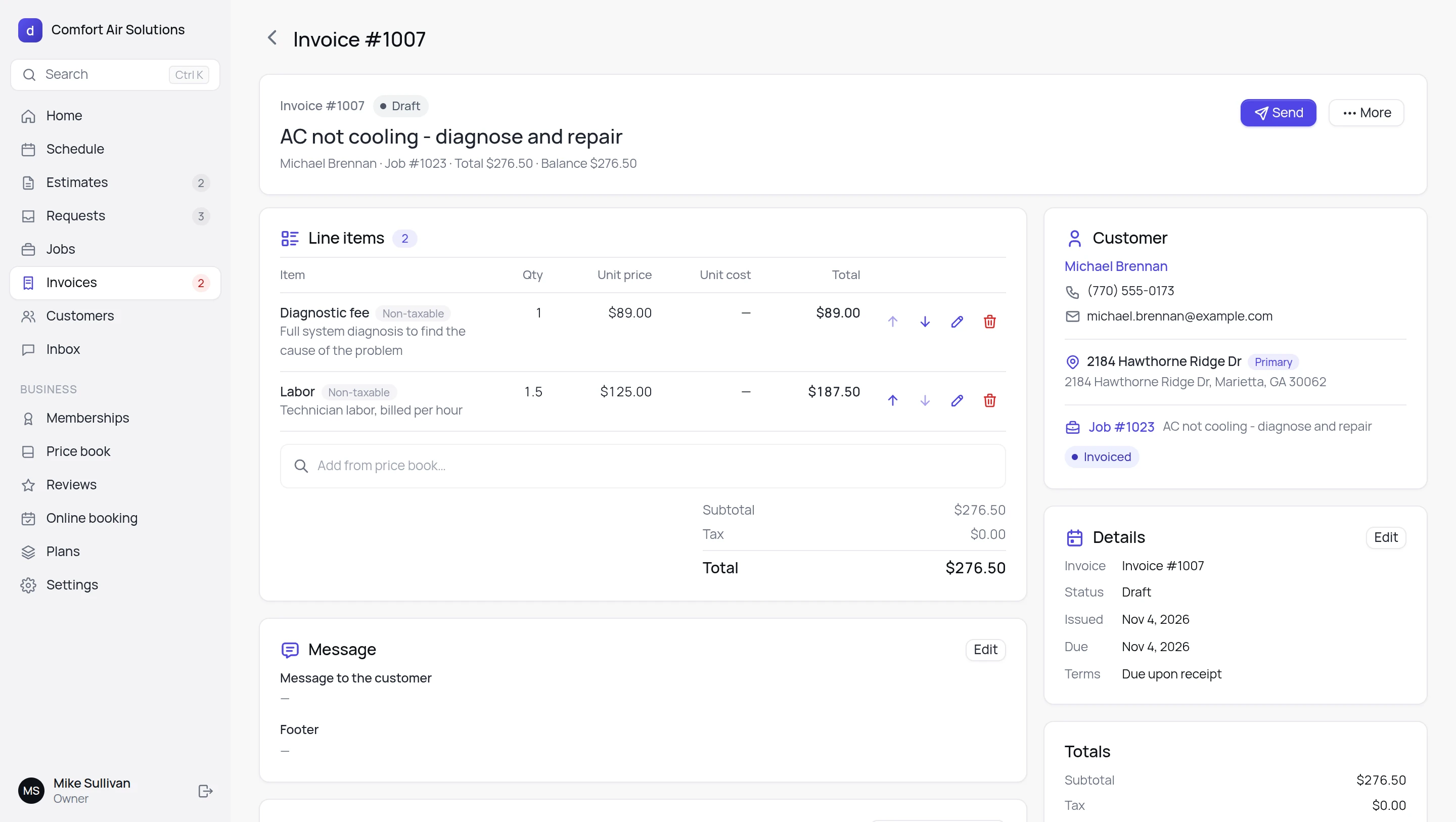
On the job page tap More, then Create invoice. The invoice takes the customer, the line items and the total from the job, and the job is marked as invoiced. The invoice opens as a draft, due on receipt.
Review the invoice and send it
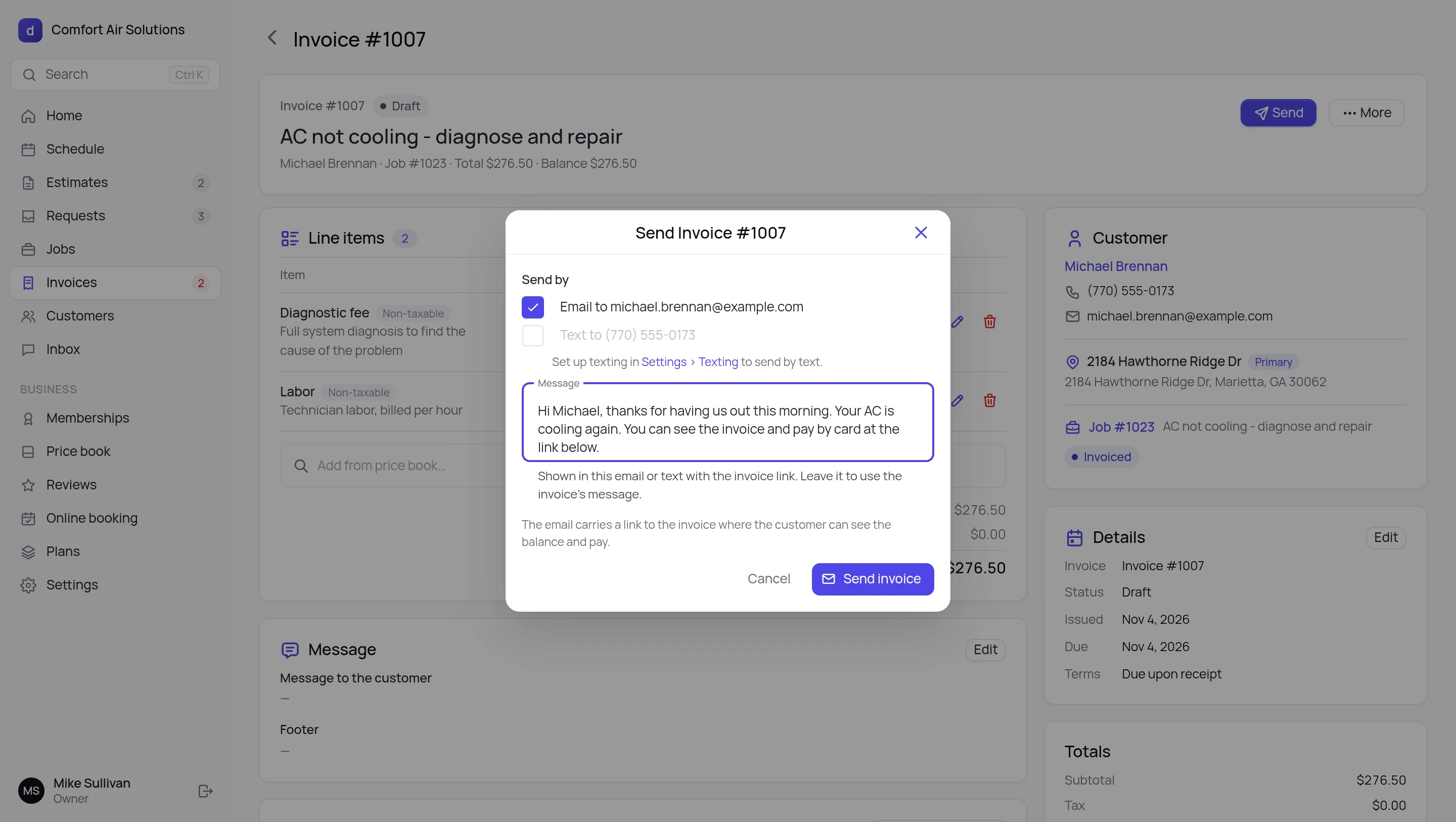
Check the draft. Anything on it can still change: quantities and prices, more lines from the price book, the dates and terms, and the message and footer. When it looks right, tap Send. Add a short note and tap Send invoice: the customer gets an email with a link to the invoice, where they can see the balance and pay by card. On Max, tick Text as well and the same link goes to their phone from your business number.
What happens next.
The same five steps work from a phone's browser, so a tech can bill from the driveway. See the phone screens.
Once the first invoice is out.
- Schedule the work: add a visit to a job and it lands on the dispatch board.
- Quote first: More on a job has Create estimate.
- Sell yearly plans: on Pro, the service plans module renews on the card on file and reminds members to book.
- Bring your customers over: upload an export from Jobber, Housecall Pro or a spreadsheet.
- Still writing some bills by hand: the free plumbing, HVAC, electrician and handyman invoice templates come in Sheets, Excel, Word and PDF, with filled-in examples. Lawn and landscape crews get a sample landscaping invoice and a monthly mowing invoice in the landscaping invoice template.
FAQ
How do I invoice as a contractor?
Keep the work and the bill in one place. Add the customer, create a job for them with the services and parts you did as line items, then create the invoice from that job and send it. The invoice takes the customer, the line items and the total from the job, so nothing is typed twice. The five steps above take about five minutes on a new account.
What goes on a job invoice?
The customer and the service address, the job it is for, each line item with its description, quantity and price, the total, the issue date, the due date and the payment terms, plus an optional message and footer. Deepsel fills all of these in from the job, due on receipt by default, and you can edit any of them before you send. For the same layout on paper, the free HVAC, plumbing and electrician invoice templates carry those fields plus the license number and a tax flag per line.
Do I have to schedule a visit before I can invoice a job?
No. When you create the job there is an Add a visit switch. Turn it off and the job is saved as unscheduled, and you can still open More on the job and tap Create invoice. Add a visit later from the job page if there is work to dispatch.
Can I change the invoice before the customer sees it?
Yes. A new invoice is a draft. Until you tap Send you can change the quantity or price of any line, add more lines from the price book, reorder or delete them, and edit the issue date, due date, terms and the message and footer the customer sees.
How does the customer pay?
The email you send carries a link to the invoice, where the customer can see the balance and pay by card. On Max you can text the same link from your business number too.
Is the free plan enough to do this?
Yes. Invoicing and card payments are core features, so they are on the free plan: 30 estimates and 30 invoices a month for your whole team, no card required. Pro is $29 a month for unlimited estimates and invoices. If you are still weighing it against Jobber, Housecall Pro and the rest, our field service software for small business comparison shows what 14 tools cost at 1, 3 and 8 users.
Can a tech do this from a phone?
Yes. Techs open Deepsel in the phone's browser, so there is nothing to install. They tap On my way, Start and Finish on the visit, then create the invoice from the job. See the phone screens on the homepage.
Can I send a quote before the job?
Yes. More on a job also has Create estimate, and Estimates in the left menu lists them all. The steps for a quote are the same as for an invoice: customer, line items from the price book, send.
I am coming from Jobber or Housecall Pro. How do I get my customers in?
Export your customer list and upload it, then skip step 1. There are step-by-step pages for Jobber, Housecall Pro, ServiceTitan, Service Fusion and FieldEdge.