Free maintenance agreement tracking spreadsheet for HVAC & home-service shops
- Free. No signup and no email asked; the links below go straight to the sheet.
- The renewal and admin-cost numbers are sourced at the bottom.
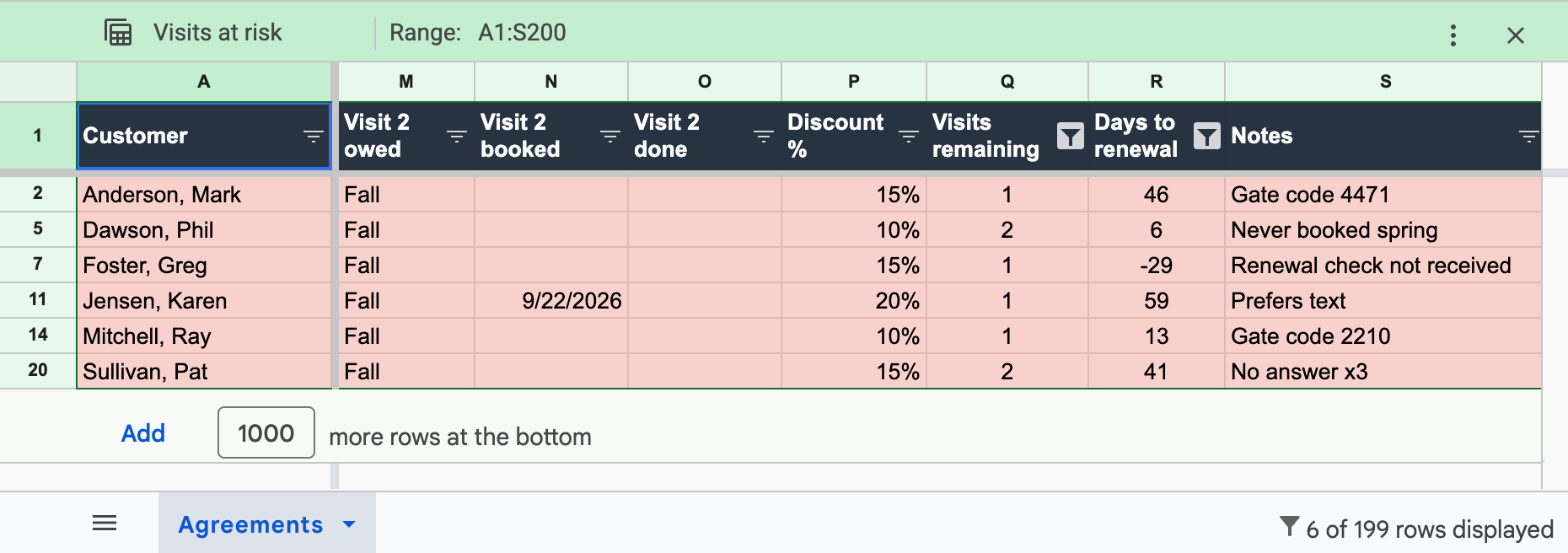
This free tracking spreadsheet keeps one row per maintenance agreement: customer and contact, plan and tier, start and renewal dates, payment method, systems and filter sizes, both visits (owed, booked, done) and the discount. Three saved filter views show what's due this season, what expires within 30 days, and which paid visits are at risk.
Open it in Google Sheets to look around first, or make your own copy in one click and start typing. Prefer Excel? Your copy downloads as .xlsx from Google's File menu (File > Download > Microsoft Excel), and both formulas come with it.
That's the whole transaction. No form, nothing to fill in, no follow-up email, because I never asked for your email. I built the sheet because every small shop I read about ends up building some version of it anyway, usually out of a paper binder, and most of them are missing the two formulas and the at-risk view that make it worth keeping.
What's in the sheet
One tab, 19 columns, one row per agreement. Columns A through S cover the customer (name, phone, service address), the plan (tier, start date, renewal date, payment method), the equipment (each system by model and serial, plus filter sizes so the tech has the right one in the truck), visit 1 and visit 2 with owed, booked and done dates, the discount percent, and a notes column for gate codes and dogs.
Two formulas do the counting for you. Visits remaining counts owed visits with no completion date yet. Days to renewal counts down to the anniversary and goes negative once an agreement has lapsed. On top of those sit the three saved filter views: due this season, expiring in 30 days, and visits at risk. The 21 sample rows are a made-up Raleigh shop, there so you can see how every column gets used. Delete them and type in your members. If you want the reasoning behind each column and both formulas, that's in how to track HVAC maintenance agreements, the long version of this page.
How to use it
The sheet earns its keep in three short passes. Two follow the seasons, one is monthly.
When the season opens
March and September for most of the country. Open the "due this season" view and work it top to bottom as your call list. Text first, then email, then call whoever went quiet. Type the booked date in as you go, and the done date when the tech closes the job. That last habit is the one that fails first, because the person who owns the sheet is usually also answering the phones. Give it to one named person.
The renewal pass, once a month
Open "expiring in 30 days." Members on card on file renew when you run the charge, so their row is a reminder to run it. Members paying by invoice or check get their renewal notice now, a month early, not on the anniversary. A negative number in the days-to-renewal column means the agreement already lapsed while nobody was looking.
The visits-at-risk check
Same monthly sitting, second view. "Visits at risk" shows agreements inside 60 days of renewal with a paid visit still undelivered. Book these first. Each one is prepaid work about to expire, and an expired visit turns into a refund conversation or a member who quietly doesn't renew.
Where the sheet breaks
I'll be straight about the ceiling, since I also sell the tool that sits above it. Run with the habits above, this sheet is a real system to about 80-100 agreements. Past that, the sheet isn't the problem. Time is. Four jobs stay human no matter how clever the columns get, and each of them has a price.
- It won't charge the card on the renewal date. Renewals someone has to ask for convert at 40-50%, while card-on-file auto-charges land at 80-95%.1, 2 The sheet tells you who's due; agreement software collects the money.
- It won't text a member a booking link when spring opens. Someone works the whole season list by hand, in the same weeks the phones fill with breakdown calls. Sending those texts is the first thing an agreement autopilot takes over.
- It won't warn anyone before a paid visit expires. The at-risk view only works when a person opens it, and a skipped month means prepaid work lapses in silence. Expiry protection runs that check every day.
- It can't show a member their own status. When someone calls asking whether they've used their second visit, your office looks it up. In Deepsel, the member sees the same ledger you do.
Those human tasks run $10-15 of admin per agreement per year,3 which is $1,000-1,500 a year at 100 agreements, before counting the renewal points lost to manual billing. And when the sheet starts costing more than software would, the move is short: these columns are Deepsel's import format, so switching means uploading this exact file. Pricing is flat and public on the pricing page. Want to shop around first? The best HVAC maintenance agreement software comparison ranks every option by shop size, and the multi-trade page covers plumbing and electrical shops, where the sheet works the same with one inspection instead of two tune-ups.
14-day free trial. No credit card required.Frequently asked questions
Can I import this into Deepsel?
Yes. The columns here are Deepsel's import format, so migrating means uploading this exact file. Do it during the 14-day trial and the ledger, renewal dates and reminder queue get built from your rows. Import help is included.
Is there a PDF version?
No, and that's on purpose. Print straight from Google Sheets instead: open the view you want, hit File > Print, and fit to width. A PDF would freeze the formulas and the filter views, and those are the reason this beats a paper list.
Does it work in Excel?
Yes. In Google Sheets go to File > Download > Microsoft Excel (.xlsx) and both formulas survive the download unchanged. The three filter views are a Sheets feature, so they don't come along; recreate them in Excel as plain filters using the same rules (due this season, expiring in 30 days, visits at risk).
Sources
- Smart Service, "How much should HVAC service agreements cost?" - "Monthly auto-pay or annual auto-renew with explicit opt-out language drives 80%+ renewal rates. Manual annual renewal processes drop to 40-50%." smartservice.com, retrieved June 2026.
- Pipeline, "Contractor membership program" - "top operators clear 90-95% on monthly auto-billed plans vs 75-80% on annual renewals." pipelineon.com, June 2026.
- Profitability Partners, "HVAC maintenance agreements profitability" - admin/billing overhead $10-15 per agreement per year. profitabilitypartners.io, June 2026.