How to track HVAC maintenance agreements (and stop visits from slipping through the cracks)
- Based on about 580 sourced data points on how 1-4-truck HVAC shops run their agreements: contractor forums, vendor help centers, trade press, state and federal record-keeping rules.
- Sources are at the bottom.
To track HVAC maintenance agreements, record five things per agreement: plan and tier, equipment covered (with filter sizes), visits owed vs delivered, renewal date and payment method, and the discount. Keep them in one of three places: a spreadsheet (fine to about 80 agreements), your field-service platform's module, or an agreement autopilot beside your FSM that delivers the visits itself.
I'll set up all three below and show you exactly where each one leaks. There's a decision table by agreement count further down. The spreadsheet in option 1 is spelled out column by column, formulas included, so you can build it in twenty minutes. And whatever sheet you end up with uploads straight into option 3, so nothing you type is wasted.
14-day free trial. No credit card required.What you're actually tracking
A maintenance agreement is a prepaid promise. The homeowner paid you $150-300 for the year (or $15-30 a month), and in return you owe them two tune-ups, a repair discount and priority scheduling. Tracking it means you can answer four questions about any member without opening a second window. Are they active? What do they get? Which visits have they had, and on which unit? When and how do they renew?
Contractors describe the need in plain words, and I'd rather quote them than paraphrase. An office manager at a 4-tech shop: "I just need something that tracks if and when they get their 2 maintenance visits, renewal date, tier level, last visit date, etc… I just need something to help me stay more organized and not let people slip through the cracks."1 Another contractor, on what matters most: "The biggest thing is having a system in place that keeps track of when their visits are. You don't want to collect money, then never do the work."2
Those two quotes give you the five fields every system below has to hold.
| Field | What goes in it | Why it has to be per agreement, not per customer |
|---|---|---|
| Plan and tier | Bronze / Silver / Gold, price, monthly or annual | Decides what the member gets on every call |
| Equipment covered | Each unit by model and serial, plus filter sizes, UV bulb, belt | On a two-system home the plan usually covers one unit, and the tech needs the right filter in the truck |
| Visits owed vs delivered | Visit 1 (spring AC) and visit 2 (fall heat): owed, booked date, completed date | This is the ledger that ends "I paid for two and got one" |
| Renewal date and payment method | Anniversary date; card on file / invoice / check at the last visit | Manual renewals convert at 40-50%; card-on-file auto-renewals at 80%+3, 4 |
| Discount entitlement | 10-15% repair discount, waived diagnostic, priority terms | Whoever answers the phone has to put it on the invoice |
Option 1: a spreadsheet (works to about 80 agreements)
Nearly every small shop's program starts here, usually as a sheet that grew out of a paper binder.1 That's fine. Done properly, a spreadsheet is a real system up to roughly one truck's worth of members. Here's the setup that works, and the exact point where it stops working.
You don't have to build it yourself. The finished tracker is free in Google Sheets, with 21 sample rows, both formulas and the three filter views already set up: get it here, or make your own copy in one click. Delete the sample rows and type in your members. The columns below explain what each one is for.
One row per agreement, these columns
| Column | Header | Notes |
|---|---|---|
| A | Customer | Name as it appears in your FSM or QuickBooks, so the row matches later |
| B | Phone | The number you text from |
| C | Address | Service address, not billing |
| D | Plan / tier | Data-validation dropdown: Bronze, Silver, Gold |
| E | Start date | Date the agreement was signed |
| F | Renewal date | Start date + 1 year; update on each renewal |
| G | Payment method | Dropdown: card on file (monthly), card on file (annual), invoice, check at visit |
| H | System(s) | Model / serial per unit; a second unit on the plan is a second row |
| I | Filter size(s) | Whatever the tech needs in the truck |
| J | Visit 1 owed | Season it belongs to: Spring |
| K | Visit 1 booked | Date, blank until booked |
| L | Visit 1 done | Date, blank until the tech closes it |
| M | Visit 2 owed | Fall |
| N | Visit 2 booked | |
| O | Visit 2 done | |
| P | Discount % | What the invoice has to carry |
| Q | Visits remaining | Formula, see below |
| R | Days to renewal | Formula, see below |
| S | Notes | Gate code, dog, "call before 9" |
The two formulas that matter
Column Q, visits remaining, counts the visits owed this plan year that have no completion date yet. With two visits a year:
=COUNTA(J2,M2)-COUNTA(L2,O2)Column R, days to renewal. A negative number means the agreement already lapsed.
=F2-TODAY()Both work unchanged in Google Sheets and Excel.
Three conditional-formatting rules
- Due this season. Highlight rows where the current season's "owed" cell is filled and its "done" cell is blank. That's your spring and fall call list.
- Expiring in 30 days. Highlight rows where column R is between 0 and 30. That's your renewal list.
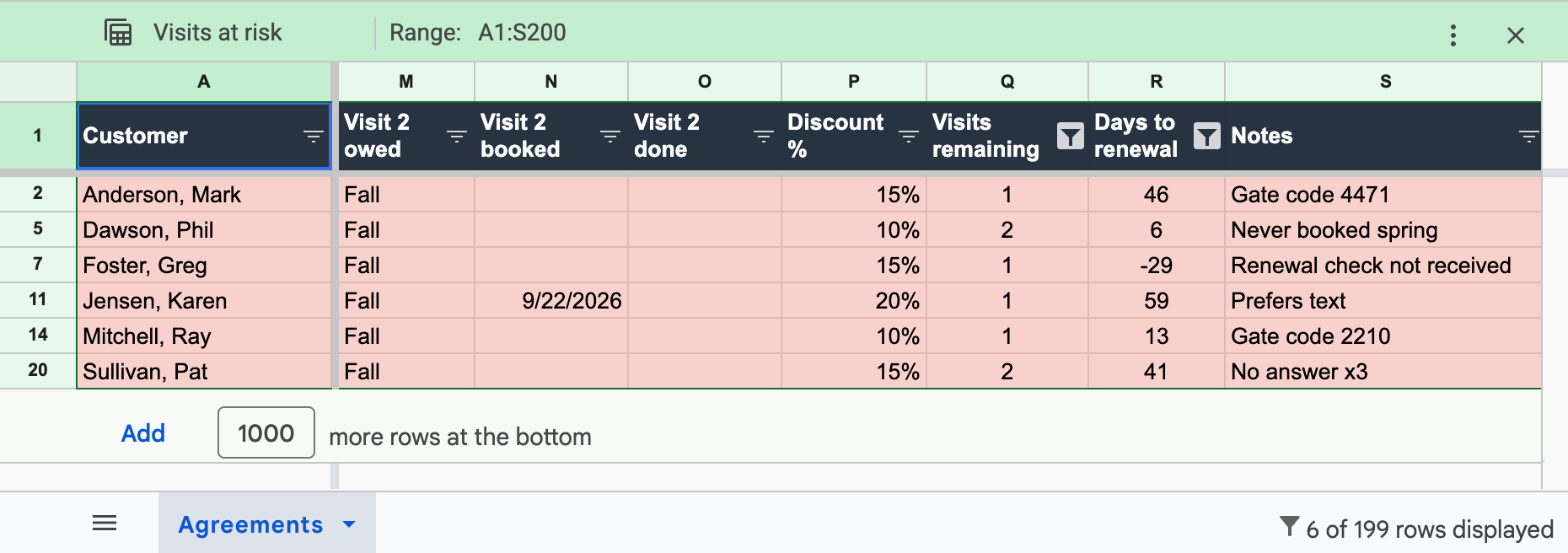
- Visits at risk. Highlight rows where column R is under 60 and column Q is above 0. These are prepaid visits that will expire undelivered unless somebody books them this month.
Save each one as a filter view too, so the three lists are a click away.
The workflow that keeps it true
A sheet is only as good as the habits behind it. Four of them:
- Every signup becomes a row the same day, with the nameplate data the tech photographed. A signup that only lives as a note in the FSM is the first row that goes missing.
- Every completed tune-up gets its "done" date typed in when the job is closed. This is the step that fails first, because the person who owns the sheet is also the person answering the phone.
- When each season opens (March and September for most of the country), filter "due this season" and work the list. Text first, then email, then a call.
- Once a month, filter "expiring in 30 days" for renewals and "visits at risk" for prepaid work about to lapse.
Where the sheet breaks
The break point is somewhere around 80-100 agreements, and it's a people problem before it's a spreadsheet problem. The same office manager quoted above, a few months later: "Previously we called each customer but as we've grown and my role has grown… I now have the issue of not having the time to call individuals. I've emailed, sent texts, etc."5 A CSR at a much bigger shop is blunter: "'We Will Call You For Tune Ups' is a trap. If you're overbooked or a lot of inbound calls, you're not getting to everyone."6 And the founder of a tracker app sees the same shape from the vendor side: "80 agreements all with different anniversary dates, and the office manager is also answering phones, scheduling, and doing invoicing. So agreements just quietly lapse."7
There are four things a sheet can never do, no matter how clever the formulas get. It can't charge the card on the renewal date. Nobody gets a booking reminder from a spreadsheet. A member whose prepaid visit is about to expire gets no warning, and they have no way to look up their own status. Each of those is a human task. At $10-15 of admin per agreement per year,8 those human tasks cost $1,000-1,500 a year at 100 agreements, and that's before you count the 30-40 renewal points you lose by asking for the money instead of charging a card.3, 4
Option 2: your field-service platform
If you already pay for Jobber, Housecall Pro, Service Fusion or FieldEdge, the obvious move is to track agreements there. I checked what each one holds against the vendor's own help pages and the shops using it. Short version: less than you'd hope. (Every FSM side by side, with prices, is on the best HVAC maintenance agreement software page.)
| FSM | What it tracks | What it leaves to a spreadsheet |
|---|---|---|
| Jobber | Recurring jobs (a visit schedule), client tags, custom fields, recurring invoices | No agreement or membership object at all. A feature request has sat open in Jobber's community for years.9 No visits-owed count, no discount enforcement, and renewal is a manual invoice. The full four-part workaround is in how to run maintenance plans in Jobber. |
| Housecall Pro | Service Plans on the Max tier ($299/mo annual, $329 monthly10): recurring billing, scheduled visits, an unscheduled-visits list | The visits list is a manual to-do list the office works by hand;11 billing frequency and the saved card lock once a plan is active;12 completed plan visits invoice at $0.00 with no link to the plan payment.13 Shops on Basic or Essentials have no module. The details and workarounds are in Housecall Pro service plans, explained. |
| Service Fusion | Recurring invoices; a service-agreement screen | An office manager running three tiers: "their service agreement management is basically non-functional for our needs." The shop tracks in Excel beside it.1 |
| FieldEdge | Service agreements with reminder dates; strong QuickBooks accounting | "The dates change for seemingly no reason, they'll switch to inactive if the maintenance isn't scheduled by the set reminder date, and half the time I try to save an agreement it just gives me errors."14 |
| ServiceTitan | A full membership object: recurring service events, renewals, member pricing. "Makes tracking, scheduling and automatic renewals very simple" at 2,500 members15 | Price is quote-only, reported at $250-500 per tech per month plus migration,16 and failed-payment alerts are missing by default ("$8,661 in failed transactions, no alerts received"17). The same contractor's advice: "I wouldn't make the jump to service Titan until you've got at least four vans on the road with 300 to 500 maintenance agreements."15 |
The pattern across all four sub-ServiceTitan platforms is the same. They track the visit (a job on a calendar), sometimes the billing (a recurring invoice), and none of them tracks the agreement, meaning the ledger of what was paid for against what was delivered. So the office keeps a sheet beside the FSM anyway. Now there are two places to update after every tune-up. The feature-by-feature comparison is on the HVAC maintenance agreement software page.
If you have no FSM, you're in good company. A big share of 1-3-truck shops run on Google Calendar, QuickBooks and a whiteboard, and in the r/HVAC thread that ranks for this exact question the two answers are "Google calendar would probably work fine" and "Google Calendar is simple and will do what you need."18 Fair enough for appointments. A calendar holds none of the five fields above, though. Pair it with the spreadsheet in option 1, or go straight to option 3, which works without an FSM.
Option 3: an agreement autopilot beside your FSM
The third way is a tool whose only job is the agreement ledger, running alongside whatever you already use for dispatch and invoicing. That's what Deepsel is. Your FSM keeps customers, quotes, dispatch and invoices. Deepsel keeps the five fields above and does the four things the sheet couldn't.
- The ledger updates itself. The tech signs the member up on their phone during the visit (a nameplate photo becomes model, serial and filter sizes), and each visit moves from owed to delivered when the job is closed. The office sees status, discount and visit history on one screen. So does the member.
- Renewals get charged instead of asked for. Card on file, monthly or annual, with a heads-up to the member before the charge, retries and a card-updater request if a charge fails, and a flag for your office if it still fails. This is the 40-50% to 80%+ swing3, 4 from billing mechanics alone.
- The reminders go out on their own. When the season window opens, every member with a visit owed gets an email (and, on Pro, a text) with a self-serve booking link for their unit. Non-responders get a polite follow-up automatically. The slot they pick lands on your Jobber or Housecall Pro schedule, tagged so dispatch can see where it came from.
- Expiring visits get flagged. Any visit still owed as the plan year runs down is flagged to you and to the member. It's the "visits at risk" filter from option 1, run for you every day.
Two more things the FSM modules skip. The discount lives on the member record, where the office can see it on every call. And on Pro, plan cash and delivered visits export to QuickBooks, which gives you the deferred-revenue treatment a buyer checks in diligence (that's where "paper memberships get heavily discounted").4, 19
Migration is the spreadsheet from option 1. Upload your sheet, or a customer export from Jobber, Housecall Pro or QuickBooks, during setup and map the columns. It takes a few minutes, and import help is included in the trial. Pricing is flat and published on the pricing page. Starter is $79/mo (or $66/mo billed annually) with unlimited users, auto-charge with card on file, automated booking reminder emails, membership and visit tracking, and customer and equipment records. Pro is $159/mo (or $133/mo billed annually; coming soon) and adds customer and schedule sync with Jobber / Housecall Pro, booking reminder texts, QuickBooks export, an AI assistant and parts warranty tracking. No hidden fees. No percentage taken on plan revenue.
Which option, by agreement count
The benchmark density is about 250 agreements per $1 million of service revenue,20 so a 1-truck shop usually carries 50-100 and a 4-truck shop 300-500. Pick the tool by agreement count. Truck count is a rougher guide.
| Agreements | Use | Why | What it costs |
|---|---|---|---|
| Under 50 | The spreadsheet, worked monthly | One person can still call everyone each season, and the renewal dates fit on one screen | $0 software; ~$10-15 per agreement per year of office time8 |
| 50-150 | Deepsel Starter beside your FSM or calendar | Renewals move to card on file (the biggest single lever), the ledger stops depending on one person's memory, and the season list goes out as reminder emails from a live "due" view instead of a call list | $79/mo, or $66/mo billed annually |
| 150-500 | Deepsel Starter now, Pro when it ships | At this size the season list is 150-500 outbound contacts twice a year. Automated reminders and expiry flags are what make the visits happen. Text reminders, the FSM sync and the QuickBooks export start to matter once agreement cash is real money | $79-159/mo |
| 500+, or 4+ trucks | ServiceTitan (with its membership module), or Deepsel if you want to stay on Jobber / Housecall Pro | This is the line practitioners draw for ServiceTitan: "at least four vans on the road with 300 to 500 maintenance agreements"15 | $250-500 per tech per month, quote-only16 |
Record-keeping: how long to keep agreement records
No single rule covers "an HVAC maintenance agreement." Three clocks run at once, and you keep the record until the longest one runs out.
- Your state contractor-license board. California is the strictest common case (and the one people search for most). Business and Professions Code §7111 requires a licensed contractor to keep "all contracts, documents, records, receipts, and disbursements" for "a period of not less than five years after completion of any construction project or operation to which the records refer," available for inspection by the registrar.21 For an agreement, "completion" is the last visit of the last plan year. So a member who renews for six years is a record you keep for eleven. Other states range from three to five years; check your board.
- The IRS. Keep records supporting income and deductions for three years in the ordinary case, four years for employment-tax records, six years if income was under-reported by more than 25%, and seven years for bad-debt deductions.22 Agreement revenue, and deferred revenue especially, is income documentation. Most shops settle on seven years.
- EPA Section 608. Refrigerant records are a separate obligation and mostly bite on commercial work. Technicians disposing of appliances with 5-50 pounds of refrigerant must record the location and date of recovery plus refrigerant type and amounts, and technicians servicing appliances with 50 pounds or more must give the owner an invoice showing refrigerant added and records of leak inspections.23 Records required under 40 CFR §82.166 are kept a minimum of three years.24 A residential split system sits under the 50-pound line, so for most maintenance-agreement work this clock only applies to disposals.
What to keep, per agreement: the signed agreement (with the equipment schedule), each payment record, each visit's checklist or work order with date and tech, and any change to the plan. A spreadsheet row summarizes those. It doesn't replace them, so keep the documents in your FSM, your e-signature tool or a dated folder. Deepsel keeps plan, equipment, payment history and visit history on each member's record, which puts the summary and the paper trail in one place.
Frequently asked questions
How long must an HVAC servicing company keep records?
Long enough to outlast the longest of three rules. In California that's five years after completion of the work, under Business and Professions Code §7111;21 other state boards want three to five. The IRS asks for three years in the ordinary case, four for employment tax, and up to seven for some deductions, which is why most shops keep seven.22 EPA refrigerant records under Section 608 (mostly disposals and systems of 50 pounds or more) are kept three years.24
Are HVAC maintenance agreements worth it?
For the shop, yes. They fill the spring and fall shoulder seasons with pre-sold work, every visit throws off repair and replacement leads, and the benchmark is about 250 agreements per $1 million of service revenue.20 The catch is that they only pay off when the visits get delivered and the renewals get collected, which is the whole reason the tracking system exists. Undelivered visits turn the same agreements into refund disputes and a deferred-revenue liability.
What is the best software for tracking contracts?
Two different questions hide in that one. For contracts in general (MSAs, vendor agreements, e-signature and renewal dates) the category is contract-lifecycle management, so PandaDoc, DocuSign CLM and the like. For the maintenance agreements a contractor sells homeowners, the real question is which system holds visits owed vs delivered, renewal billing and discount entitlement. My answer: a spreadsheet under about 80 agreements, ServiceTitan's membership module above about four trucks, and an agreement layer such as Deepsel beside Jobber or Housecall Pro in between. The comparison is on the maintenance agreement software page.
What should be included in an HVAC maintenance contract?
The visits (usually two a year, AC in spring and heating in fall), the exact equipment covered by model and serial, the repair discount (10-15% is typical), priority-scheduling terms, price and billing frequency, auto-renewal language with an opt-out, and what happens to an unused visit at year end. The equipment line decides whether a second system is covered. It's also the line most templates leave out. The tracker columns above have a place for each item, and so does Deepsel's agreement record.
How do I track maintenance agreements in Jobber or Housecall Pro?
In Jobber, you build it from parts: a recurring job per member for the visit schedule, a client tag for the tier, a custom field for the renewal date, and a recurring invoice for billing. You'll still need a spreadsheet for visits owed and discounts, because Jobber has no agreement object.9 In Housecall Pro, Service Plans on the Max tier handle billing and the visit list, and the office works that list by hand. On Basic or Essentials, it's the spreadsheet. Deepsel runs the agreement ledger beside either one and syncs customers and booked visits with both.
Is there a free HVAC maintenance agreement tracking template?
Yes. The tracker on this page is a free Google Sheet, with the formulas, filter views and 21 sample rows already in place: open it or make your own copy in one click. It also downloads as Excel from the File menu. It's a tracker, not a contract template. And if you'd rather skip the sheet, upload whatever list you already keep into Deepsel during the trial and the ledger, renewals and reminders get set up from it.
Sources
- r/ProHVACR, "Service agreement management," February 19-20, 2025 (office manager at a 4-tech Service Fusion shop). reddit.com.
- r/hvacadvice, "Service contract/maintenance agreements," November 13, 2025. reddit.com.
- Smart Service, "How much should HVAC service agreements cost?" - "Monthly auto-pay or annual auto-renew with explicit opt-out language drives 80%+ renewal rates. Manual annual renewal processes drop to 40-50%." smartservice.com, retrieved June 2026.
- Pipeline, "Contractor membership program" - "top operators clear 90-95% on monthly auto-billed plans vs 75-80% on annual renewals"; "paper memberships get heavily discounted in diligence." pipelineon.com, June 2026.
- r/ProHVACR, "Scheduling maintenance for service agreements," May 22, 2025. reddit.com.
- r/HVAC, "Service agreement," December 18, 2023 (CSR comment). reddit.com.
- r/SideProject, "Built a free tool for HVAC contractors to track maintenance agreement renewals," March 15-16, 2026 (comment by the app's founder). reddit.com.
- Profitability Partners, "HVAC maintenance agreements profitability" - admin/billing overhead $10-15 per agreement per year. profitabilitypartners.io, June 2026.
- Jobber Community, "Maintenance contract feature" request thread. community.getjobber.com; Jobber help, "Create a recurring job." help.getjobber.com.
- Housecall Pro pricing page - Max $299/mo annual, $329/mo monthly; "Recurring Service Plans" listed as a Max feature. housecallpro.com/pricing, retrieved August 13, 2026.
- Housecall Pro help center, "Service Plans dashboard overview" - "This list will act as your reminder to schedule actual appointment times for upcoming and overdue Service Plan visits." help.housecallpro.com.
- Housecall Pro help center, "Service Plans FAQs" - "Once a Service plan has been accepted and is active in a customer's profile, the billing frequency cannot be changed"; "the credit card cannot be removed from the service plan." help.housecallpro.com, retrieved August 2026.
- r/HouseCallPro, "Service Plan headaches," February 6-7, 2026. reddit.com.
- r/hvacadvice, "FieldEdge will be the death of me," August 6, 2024. reddit.com.
- r/hvacadvice, "How do you manage your maintenance agreements," March 27, 2026 (contractor running ~2,500 members on ServiceTitan). reddit.com.
- r/smallbusiness, "ServiceTitan quote for a small plumbing shop," July 14, 2026 - "$250-500 per technician per month (based on the package)." reddit.com.
- ServiceTitan Community, "BEWARE IF USING ACH: $8,661 in failed transactions, no alerts received," November 2024. community.servicetitan.com.
- r/HVAC, "Software for tracking PMs," October 9-10, 2023. reddit.com.
- LedgerFi, "HVAC bookkeeping" - deferred-revenue treatment of a $240 annual plan. ledgerfi.co, April 2026.
- FieldEdge, "HVAC service agreement programs" - target of 250 service agreements per $1 million in service revenue. fieldedge.com, November 2025.
- California Business and Professions Code §7111(a) - records kept "for a period of not less than five years after completion of any construction project or operation to which the records refer." leginfo.legislature.ca.gov, retrieved August 26, 2026.
- IRS, "How long should I keep records?" - 3 years general; 4 years employment tax; 6 years for income under-reported by more than 25%; 7 years for worthless securities or bad-debt deductions. irs.gov, retrieved August 26, 2026.
- US EPA, "Recordkeeping and reporting requirements for stationary refrigeration" (Section 608) - disposal records for 5-50 lb appliances; invoices and leak-inspection records for appliances of 50 lb or more. epa.gov, retrieved August 26, 2026.
- 40 CFR §82.166(m) - records required under the section kept for a minimum of three years. ecfr.gov.